Migos AI Song & Video Generator from Two Photos
Make a Migos AI rap video, the Hotel Lobby trend, from two photos: original lyrics, beat, vocals and lip sync in one 15-second clip. Steps, costs and tips.
"Migos AI" is the name people search for the two-person rap clip that went viral as the "Hotel Lobby" trend: two people in an orange booth, one microphone hanging between them, trading lines. The look comes from Quavo and Takeoff's 2022 COLORS performance of "Hotel Lobby". The Rap duo makes that kind of clip from two photos and two names, and it makes the song too.
Song and video in one step
Many Migos AI tools give you a silent clip, and you add a sound on TikTok. The Rap duo gives you a finished clip with sound:
- The song: two rhyming lines written for the two names, one line each, with a beat and vocals.
- The video: both people in an orange studio with a hanging microphone. The left person raps first, then the right person takes the mic.
- The lip sync: each person's mouth moves with their own line.
The result is a 15-second 720p MP4 with sound, ready to download.
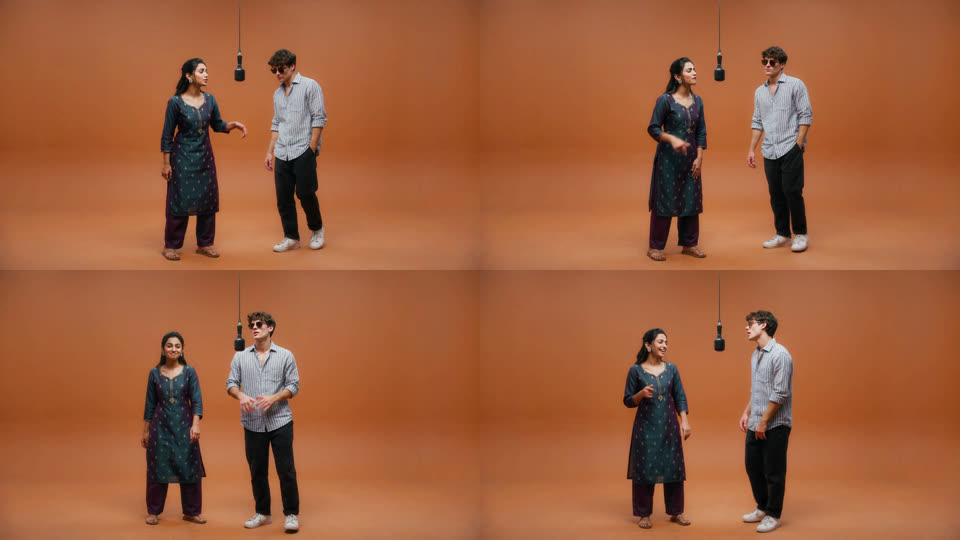
Make a Migos AI video from two photos
- Open Video generator → Rap duo in the dashboard.
- Upload the left photo and the right photo, one person in each.
- Type the left name and the right name.
- Select Generate (75 credits).
- Wait for the video. It appears in Your videos, where you can play or download it.
In our test, the video was ready in about five minutes. If generation fails, the credits come back. For photo limits, a real test run and what the model gets right and wrong, read How to Make an AI Rap Video of Two People from Photos.
It's not the real Migos song
The Rap duo doesn't use "Hotel Lobby" or any other Migos song, and it doesn't copy anyone's voice. It writes new lines from the names you type and creates its own beat and vocals. That matters when you post: a clip that uses a copyrighted song can be muted or taken down.
vibemovo is not affiliated with or endorsed by Migos, Quavo, Takeoff or COLORS. "Migos AI" here describes the video style.
Tips for a better clip
- Use clear, front-facing photos in good light. The model copies the face it can see.
- Show more of the body if you can. A full-body photo keeps the real outfit. A portrait leaves the rest to the model.
- Crop for vertical feeds. The video is 16:9. For TikTok or Reels, crop it to 9:16.
- Use photos you may use. Only animate people who agreed to it.
Questions
What does it cost? 75 credits for one 15-second video with sound. See pricing for credit packs and plans.
Can I pick the lyrics or the beat? Not yet. The page writes the lines and creates the beat.
Can I use my own song? Not in the Rap duo. You can mute the clip and add a sound in your editing app.