AI Vampire Transformation Video from One Photo
Turn one photo into a 10-second AI vampire transformation for Halloween: lightning, red eyes, fangs, a cape and bats. Steps, photo tips and a real result.
A vampire transformation video starts with you as you are, then lightning flashes and you change: pale skin, red eyes, fangs and a cape, in a gothic castle with bats in the air. It is a Halloween effect that works well as a short vertical clip.
The vampire transformation page makes that video from one photo. You don't write a prompt. You get a 10-second vertical clip with music and sound. In our test, it was ready about 6 minutes after we submitted it.
How it works
- Open Video generator → Vampire transformation in the dashboard.
- Upload your photo.
- Select Generate (50 credits).
- Wait on the page, or leave it. The video appears in Your videos when it is ready, and you get a notification. If generation fails, the credits come back.
The photo is a JPEG, PNG or WebP up to 2 MB. Behind the page, Alibaba's Wan 3.0 reference-to-video model gets the photo with a prompt in three beats:
| Seconds | What the prompt asks for | | ------- | ------------------------ | | 0–4 | A gothic castle hall at night with candles and a full moon. You stand in your own outfit, smiling. | | 4–8 | Lightning flashes and you turn into a vampire: pale skin, red eyes, small fangs, a black velvet suit and a cape lined in crimson. Bats circle behind you. | | 8–10 | You raise the cape across your face and lower it with a smirk as the bats fly at the camera. |
What a real result looks like
We gave the page one photo of an AI-generated man in a blue blazer, holding a guitar. These four frames are taken at 0.5, 3.5, 6.5 and 9.5 seconds of the result:
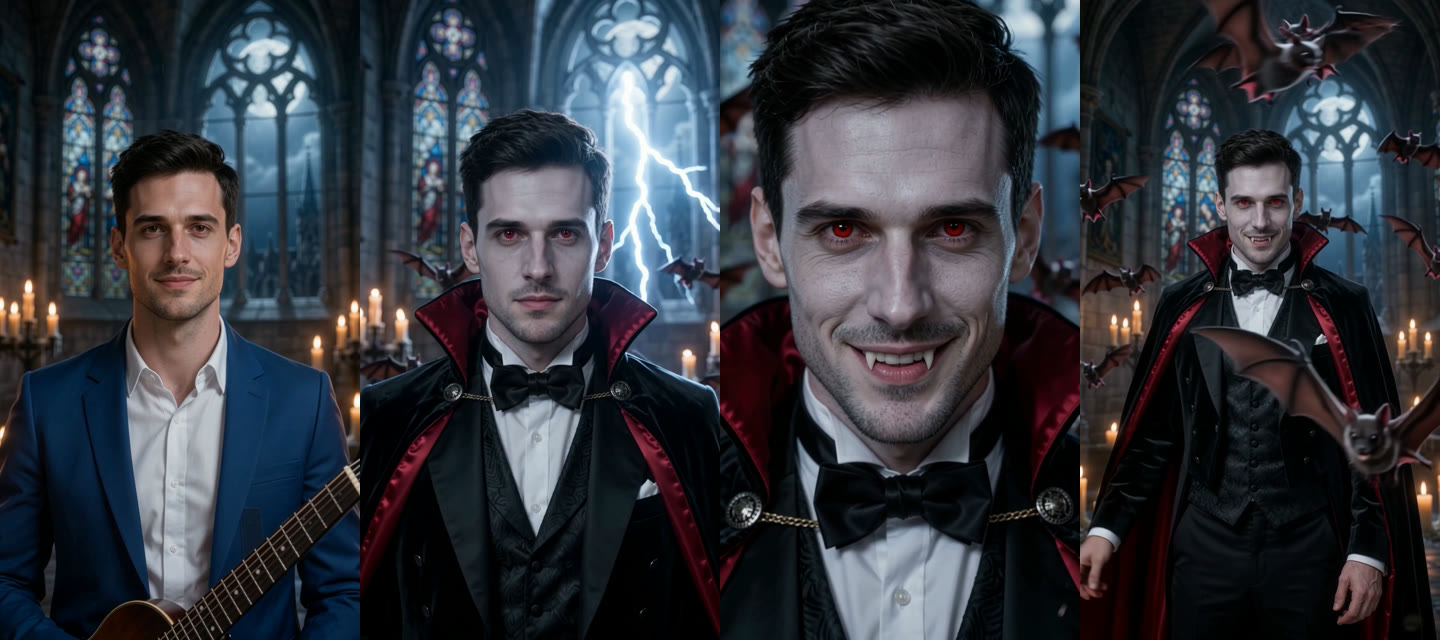
- The change came early. Lightning struck at about 3 seconds, not 4, and the cape, the bow tie and the red eyes appeared with it.
- The face stayed his. His face and hair stayed the same through the change. Only the skin turned paler.
- The photo's props came along at first. He held the guitar from the photo until the change, and then it was gone.
- The fangs got a close-up. The camera pushed in, and he smiled to show them at about 6 seconds.
- The cape move was different. He swept the cape open to the side instead of raising it across his face, while bats flew around him and one came close to the camera.
- The video is ready to post. It is a 720×1280 MP4, 10 seconds, with sound.
Choose photos that work
- One person, facing the camera. The model copies the face it can see.
- Good light. A dark or blurred face gives the model less to keep.
- Half-body works well. It leaves room for the cape. Things you hold, like the guitar in our test, can stay in the first seconds.
- Use photos you may use. Only animate people who agreed to it.
Questions
How long does it take? A few minutes. Ours took about 6. You can leave the page; the video waits in All videos.
What does it cost? 50 credits for one 10-second video. A failed video is refunded. See the pricing page for credit packs.
Is it gory? No. The prompt asks for a costume look with no blood, wounds or biting. In our test, the only red was the eyes and the cape lining.
Can I make two people vampires? Not on this page. It takes one photo of one person.
What format is the video? A 9:16 MP4, 720×1280, 10 seconds, with sound. You can post it to TikTok, Reels or Shorts without cropping.