Hug Your Younger Self AI: Make the Hug Video
Make the hug your younger self AI video from two photos: you today and you as a child, in a sunny park. Steps, photo tips and a real 15-second result.
"Hug your younger self" started as an AI photo edit: a photo of you today and one of you as a child, merged into one embrace. The video version goes a step further. You walk up to your younger self, kneel down and hold them, and the moment plays out with music.
The younger-self hug page makes that video from two photos. You get a 15-second vertical clip with music and sound. In our test, it was ready about 12 minutes after we submitted it.
How it works
- Open Video generator → Hug your younger self in the dashboard.
- Upload your photo today. You play the adult.
- Upload your childhood photo. The child in the video keeps that face.
- Select Generate (75 credits).
- Wait on the page, or leave it. The video appears in Your videos when it is ready, and you get a notification. If generation fails, the credits come back.
Each photo is a JPEG, PNG or WebP up to 2 MB. Behind the page, Alibaba's Wan 3.0 reference-to-video model gets both photos in one request, with a prompt in three beats:
| Seconds | What the prompt asks for | | ------- | ------------------------ | | 0–5 | A sunny park in the late afternoon. The child plays alone on the grass. The adult walks in and stops, surprised. | | 5–11 | The child looks up and recognizes them. The adult kneels down and they hug, eyes closed, smiling. | | 11–15 | The camera rises. The child dissolves into golden light and drifts up with the dandelion seeds. |
What a real result looks like
We gave the page two photos of the same AI-generated person: a man in a blue suit today, and the same man as a boy in a striped shirt and sunglasses. These four frames are taken at 2, 6.5, 9.5 and 12.5 seconds of the result:
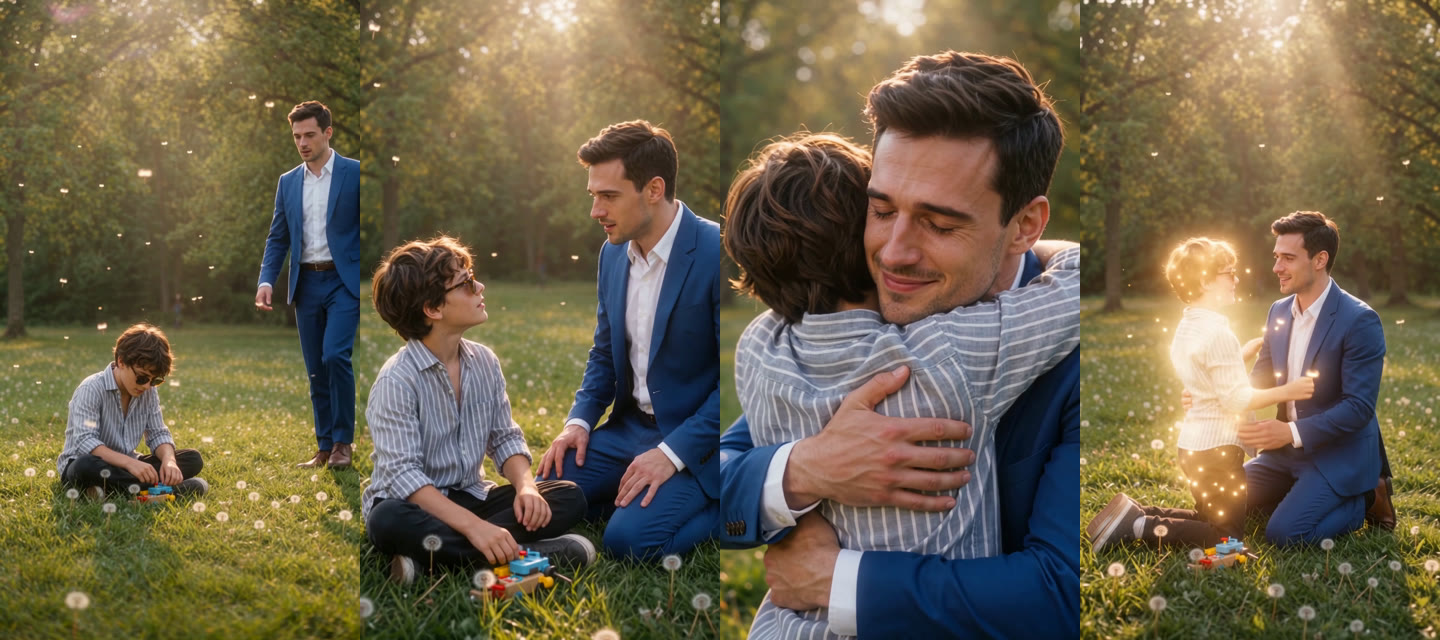
- The first two beats played as asked. The man walked in while the boy played with a toy car, knelt beside him by about 6 seconds, and the boy got up and hugged him at about 8.
- Both stayed recognizable. The man kept his face and blue suit. The boy kept the face, the hair, the striped shirt and the sunglasses from the childhood photo.
- The ending was softer than the prompt. At about 12 seconds, golden light surrounded the boy. He didn't dissolve: at the end, both of them knelt in the grass and looked up at the light.
- The video had one dissolve. At about 4 seconds, the wide shot crossfaded into a closer one.
- The video is ready to post. It is a 720×1280 MP4, 15 seconds, with sound.
Choose photos that work
- One person per photo. Two faces in one photo can end up mixed.
- Show the face clearly in both photos. The model copies the faces it can see, so the child should look like a younger you.
- Show more of the body if you can. A half-body or full-body photo keeps the real outfit. A close-up leaves the rest to the model.
- Put the photos in the right order. The first photo is you today. The second photo is you as a child.
- Use photos you may use. Only animate people who agreed to it.
Questions
How long does it take? A few minutes to about a quarter of an hour. Ours took about 12. You can leave the page; the video waits in All videos.
What does it cost? 75 credits for one 15-second video. A failed video is refunded. See the pricing page for credit packs.
Does the child always disappear at the end? No. The prompt asks for it, and in our test the child glowed but stayed. Your result can differ.
Can I change the place? Not on this page. The scene is always a sunny park.
What format is the video? A 9:16 MP4, 720×1280, 15 seconds, with sound. You can post it to TikTok, Reels or Shorts without cropping.