Raindance AI Trend: Make the Dock Video from Two Photos
Make the Raindance AI trend video from two photos: one person waits on a dock at golden hour, the other walks up singing. Steps, tips and a real result.
The Raindance AI trend comes from the music video for "Raindance" by Dave and Tems. In one scene, one person sits at the end of a wooden dock and the other sings to them. People recast that scene with themselves, friends, parents or famous rivals, then post it with the song.
The Raindance AI trend page makes the dock scene from two photos. You get a 15-second vertical clip with sound. The clip doesn't contain the song: you add it when you post.
How it works
- Open Video generator → Raindance duo in the dashboard, or use the form at the top of the Raindance AI trend page.
- Upload the photo of the one on the dock. This person waits at the end of the dock.
- Upload the photo of the singer. This person walks up and sings.
- Select Generate (75 credits).
- Wait on the page, or leave it. The video appears in Your videos when it is ready, and you get a notification. If generation fails, the credits come back.
Each photo is a JPEG, PNG or WebP up to 2 MB. Behind the page, Alibaba's Wan 3.0 reference-to-video model gets both photos in one request, with a prompt in three beats:
| Seconds | What the prompt asks for | | ------- | ------------------------ | | 0–5 | A wooden dock over a calm turquoise sea at golden hour. The first person sits at the far end. The singer walks along the dock toward them. | | 5–10 | A slow push-in on the singer, who sings to the first person. The first person turns and smiles. | | 10–15 | A cut to behind the two: they sit side by side at the end of the dock, facing the sunset. |
The prompt asks for a wordless melody and never names the song, its artists or its lyrics.
What a real result looks like
We gave the page two photos of AI-generated people: a woman in a green suit for the dock, and a man in a blue suit as the singer. These four frames are taken at 2, 6, 9.5 and 13 seconds of the result:
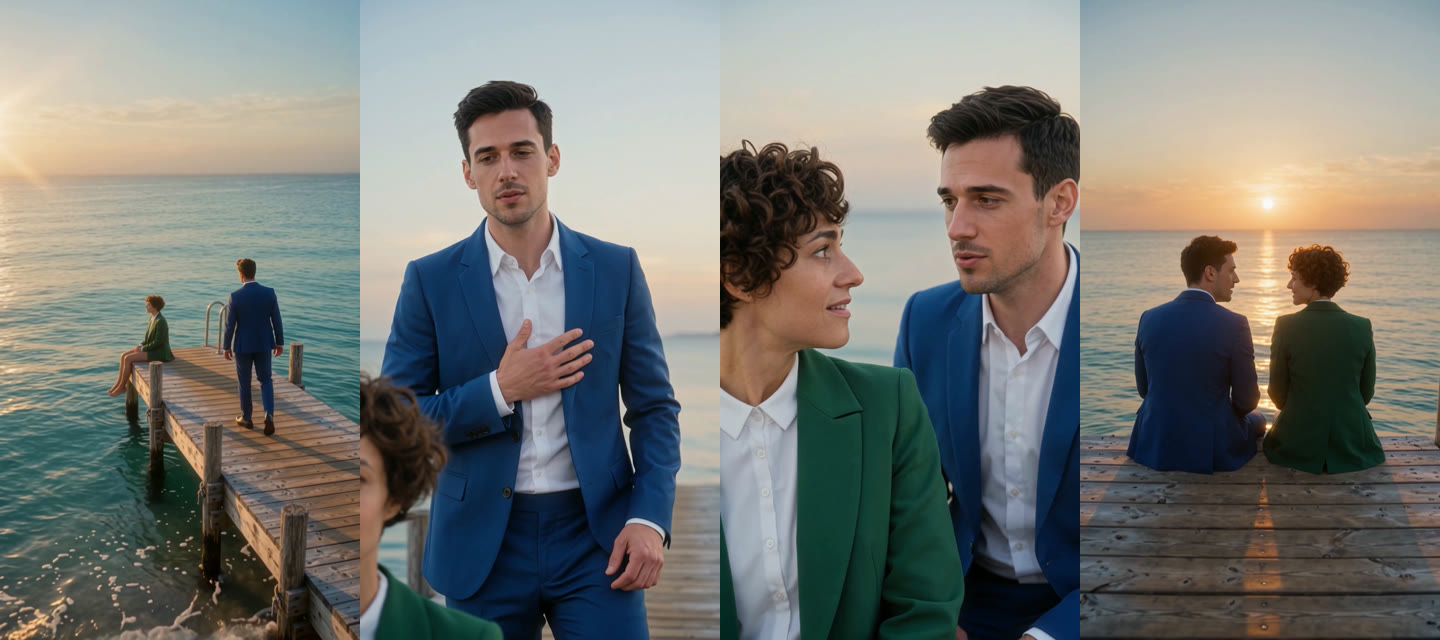
- The three beats played as asked. The woman sat at the end of the dock with her legs over the water, and the man walked toward her. From about 6 seconds, he sang to her with a hand on his chest. From about 11 seconds, the two sat side by side and faced the sunset.
- The middle beat was closer than the prompt. The woman didn't turn around. The camera cut to the two side by side, and she looked up at him and smiled.
- Both stayed recognizable. Each person kept the face, hair and suit from their photo.
- The video had no text. There were no subtitles or logos to crop.
- The video is ready to post. It is a 720×1280 MP4, 15 seconds, with sound.
Add the song
The video has its own sound. To match the trend, replace it with the song when you post:
- Download the video.
- Upload it to TikTok or Instagram Reels.
- Open the sound picker, search for "Raindance", and select the song.
- Turn the original sound down or off.
Choose photos that work
- One person per photo. Two faces in one photo can end up mixed.
- Show the face clearly. The model copies the faces it can see.
- Show more of the body if you can. A half-body or full-body photo keeps the real outfit. A close-up leaves the rest to the model.
- Put the photos in the right order. The first photo is the one on the dock. The second photo is the singer.
- Use photos you may use. Only animate people who agreed to it.
Questions
Does the video include the Raindance song? No. We don't use the original song. Add it from the app's sound library when you post.
What does it cost? 75 credits for one 15-second video. A failed video is refunded. New accounts get enough free credits for one. See the pricing page for credit packs.
How long does it take? A few minutes to about a quarter of an hour. You can leave the page; the video waits in All videos.
Can I change the place? Not on this page. The scene is always a dock over the sea at golden hour.
What format is the video? A 9:16 MP4, 720×1280, 15 seconds, with sound. You can post it to TikTok, Reels or Shorts without cropping.